
AI alongside your existing systems
Most SMEs have systems that work: accounting, stock management, CRM. Nobody wants to replace them, and you don’t need to either. AI can work alongside these systems, utilise their data and take the strain off where tasks are repetitive. I have built two such solutions and will show you how they can benefit your day-to-day operations. To find out why automation and AI go hand in hand, read the article AI in SMEs: A Catalyst Rather Than a Replacement’.
My first solution, SocialSolution, turns a campaign briefing into strategies, content and image ideas. The second, LedgerMagic, checks supporting documents for trust offices, both before they are posted and after they have been posted.
1. The existing system remains the truth
LedgerMagic does not replace the accounting software. The latter remains the primary system, and data flows in both directions. The assistant reviews a voucher whilst it is still a draft, suggests an account and tax code, and saves the corrected draft back into the software. It is not posted automatically: that remains a decision for a specialist. Conversely, LedgerMagic learns from entries that have already been posted in the software and checked by specialists. In this way, the firm’s existing knowledge is incorporated into the suggestions.
There is a simple reason why the check takes place at the draft stage: once a document has been posted, it can no longer be amended via the interface; any correction would require a manual reversal entry. That is why the check intervenes at the stage where an error does not yet incur any costs.
A practical question for your system: Is there a stage at which data can still be amended – for example, a draft, a request or a ‘pending review’ status? That’s the best place to start.
2. The right channel for every task: rules, AI & humans
AI excels in terms of volume and variety: it can read hundreds of different documents or briefings without anyone having to write a rule for every format. Its weakness is that it can make mistakes and make things up. That’s why I divide the tasks up as follows:
|
Sub-process |
Actor |
What happens in LedgerMagic |
|---|---|---|
|
Entry |
Automation |
New receipts are collected regularly and placed in a queue. Only five are processed per minute to ensure that nothing becomes overloaded. |
|
Read and suggest |
AI |
AI scans bills or receipt, suggests an account and tax code, and explains why. |
|
Evaluate |
Automation |
Duplicate documents, incorrect accounts, zero amounts or discrepancies with the previous entry are automatically flagged as ‘to be checked’. |
|
Approval |
Specialist |
A person approves items Individually or in batches. All have a clear booking justification. Corrected draft is sent back to the accounting software. |
|
Learning |
Automation |
Audited entries that have been approved, are stored , the system only records the following details: supplier, account, tax code, amount and frequency. |
The same pattern applies in the first solution. In that case, the AI occasionally generated invalid data, such as 29 February. A simple check then stores an empty field instead of an incorrect date.
The result of this division of labour: AI handles the volume, the rules ensure quality at every stage, and the specialist makes the final decision.
3. Allow room for experimentation
Neither of these solutions turned out quite as they are today at the first attempt. This is normal, and it is worth factoring it in. There are three lessons that apply to almost every AI project in an SME.
- Consciously shaping the AI’s memory. An AI does not know how your business operates. For it to behave like your experts, it needs two things: a knowledge base to consult, and rules to follow. This is precisely where I have experimented the most to achieve optimal use of AI whilst maintaining full process control, with user behaviour continuously feeding into the application’s knowledge base.
- Comparing different AI models. Not every AI is suitable for every task. For structured texts, a fast model was suitable (typically 5 to 7 seconds). A slower one (15 to 20 seconds) performed more reliably when it had to interface with other systems. A third model generated results and was assigned different tasks. For LedgerMagic, I tested seven models hosted in Switzerland against the official SME chart of accounts. Three initially returned blank responses because they had already reached their processing limit whilst thinking. The first test was small-scale; further tests will follow. (Typical values from my project; not a benchmark.)
- Let the AI write the code, whilst retaining control. I deliberately have the user interface and documentation generated by the AI. This speeds up the process and ensures compliance with the required documentation standards. In October, I rebuilt the review view in this way, with the list and justification side by side. What lies behind it remains my responsibility: which rules apply, when a human approves something, and what is logged. That is my experience, not a measurement.
What this means for you: Set aside time to test knowledge, rules and models against real-world processes. Let AI speed up the user interface and documentation, but retain control over the logic and approval process.
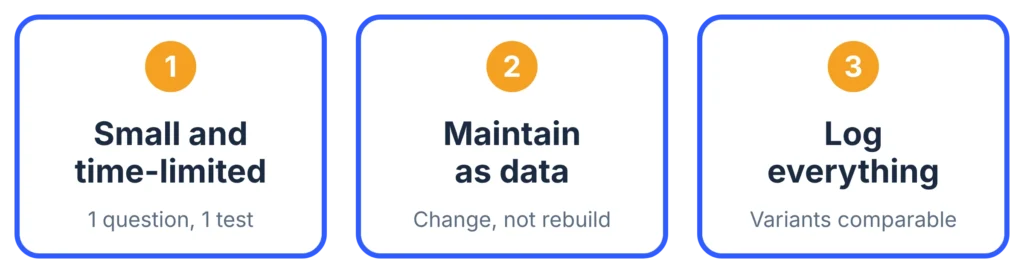
Three rules make such experiments inexpensive:
- Small and temporary. An experiment has a test case, a question and an end.
- Maintain prompts, model selection and rules as data; do not hard-code them into the workflow. In both solutions, the instructions for the AI are stored in a separate table. An experiment then consists of a change to an entry, not a complete overhaul.
- Log everything. Every AI call is stored along with the command and the response. This makes it possible to compare different versions, and in case of doubt, it is possible to trace what happened.
You should also bear in mind that some of the ideas will be discarded. This isn’t a failure, but the price you pay for a solution that stands the test of everyday use.
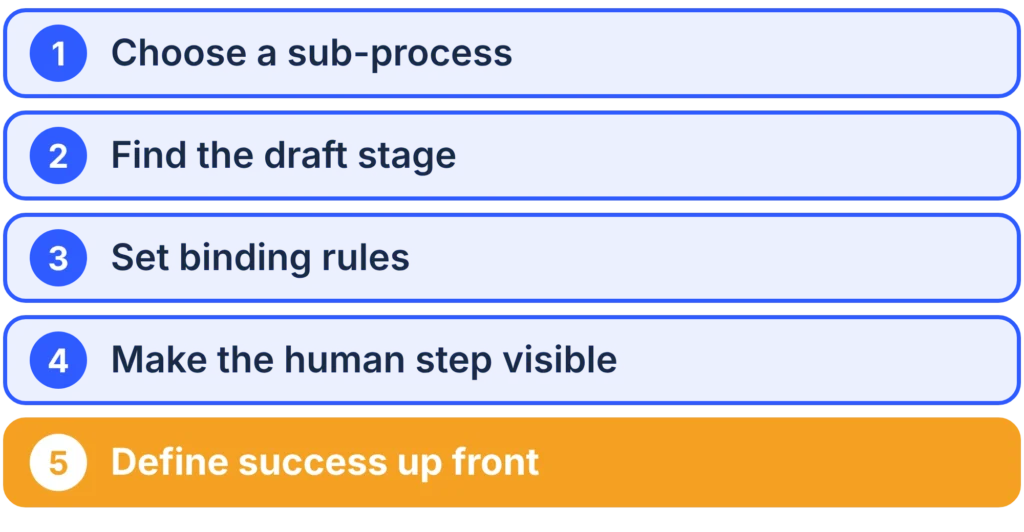
4. How to get the most out of your systems
- Choose a sub-process, not the entire workflow. Ideally, this should be a task that is repeated frequently, requires specialist knowledge and involves exceptions.
- Identifying the design stage. Where can data still be changed, and at what point is there no turning back?
- Establish binding rules. Anything that must apply should be set out in a rule, not left to the AI.
- Making the human element visible. The specialist reviews the proposal, the justification and the rule applied, and makes a decision.
- Define success in advance. Before you start, decide what indicators you will use in three months’ time to gauge whether things have improved: time, rework, error rate. Then measure those.
What this means for your business
You don’t need a new system to benefit from AI. You need a clearly defined sub-process, a point at which a human gives final approval, and scope to try out different options. That’s exactly where AI-Catalyst comes in: I make your existing workflow faster and more reliable, without taking control away from you.
If you’d like to find out which sub-process in your business is suitable for this, book a free initial consultation.
Fiduciary firms wishing to engage the assistant as a design partner can contact me via ledgermagic.ch.